Sunday, February 1, 2015

Performance Battle of NoSQL blob storages #3: Redis

We have already measured performance stats for Apache Cassandra and Apache Kafka as well. To include Redis within a comparison of persistent storages could see like some misunderstanding at first sight. On the other hand, there are certain use-cases allowing us to think about to store data in main memory, especially in private data centers. Primarily once your cluster includes a machine having almost equal size of hard drive and RAM :-)

Redis is enterprise, or advanced, key-value store with optional persistence. There are couple of reasons why everyone loves Redis. Why I do?

1. It's pretty simple.

Following command can install redis server on ubuntu. That's all.

apt-get install redis-server

2. It's incredible fast. Look at following tables. One million remote operations per second.

3. It supports large set of commands. More than some kind of database, it's rather enterprise remote-aware hash-map, hash-set, sorted-list or pub/sub channel solution supporting TTL or Lua script environment among others. See all commands.

4. It's optimized to use low computer resources, cpu and ram. Despite the redis server is single thread app it can achieve such great performance.

I've already started to talk about purposes at the beginning. We have primarily targeted two points. First, we can use Redis within super-fast deployment of our app when latency matters.

Secondly, I wanted to compare in-memory and persistent stores. Does it really worth to think about such in-memory solution?

Setup

I used following setup:
  • Redis server 2.2.6: HP Proliant BL460c gen 8, 32core 2.6 GHZ, 192GB RAM, ubuntu 12 server
  • Tests executor: xeon, 16 cores, 32gb ram, w8k server
  • 10Gbps network
  • jedis java client
  • kryo binary serialization
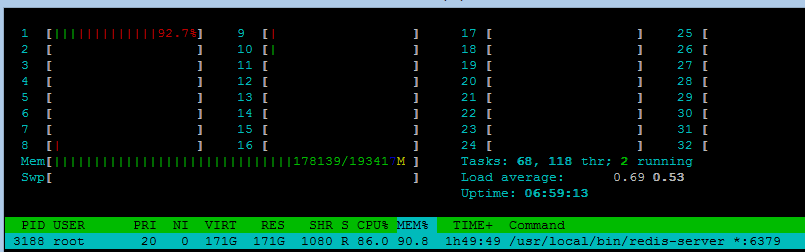
As Redis cluster feature was in development in the time of measuring these numbers, I used only one machine. 32 cores were really overestimated as Redis used one plus one core indeed.

Performance Measurement of Redis

Batch Size

Appending using LPUSH to some eight different keys.

Blob size \ Batch Size [TPS]128256102432768
100b570k570k557k600k
20kb38k40k35k33k

As main memory is touched only, it's all about network transmission. It's almost same for all sizes of batches.
Variable Connections


Utilizing LPUSH again to append to different number of keys. Every keys is accessed using different connection.

Blob size \ Connections [TPS]124832128
100b446750k646k560k960k998k
20kb9.2k16.8k20.8k34k35k52k
Ohhh. One million inserted messages per second to one Redis instance. Incredible. Java client uses NIO so this is the answer why it somehow scales with much more tcp connections. Increasing number of network pipes where a client can push the data enables better throughput.

Occupied Memory


Blob within a list.

Blob sizeBytes per Message
100b152
20kb19kb
There is some build-in compression which appeared within large message test.

Long Running


The goal of this test is to fill the main memory (192GB) with one redis instance to find out if there are some scalability limitations.

Blob sizeTPS
100b842k
20kb18.2k
Redis fill the main memory with blob messages till OOM. The shape of this progress within the time is almost flat.


Persistence


Even if Redis stores the data in the main memory, there is a way how to persist the data.

Blob size \ [TPS]With EOF (every second)With AOF (always)Without
100b800k330k960k

Redis forks a new thread for I/O. Numbers are almost same if the data are persisted within one second frames. TPS goes significantly down when Redis writes every updated key to the drive but this mode ensures best durability.

Large Messages


How the performance is affected when message size increases to tens of mbytes?

Blob sizeTPS
500 kb1418
5 mb85
100 mb1,2

Conclusion

The numbers are impressive. One-thread app successfully process almost one million of small messages in memory.

Redis performance is incredible. We could expect certain limitations because of one-threaded design which causes "serializable" behavior. Maybe this lockless implementation is the reason why redis server can handle such great throughput.

On the other hand, the right comparison against other competitors uses redis persistence feature. The performance is much more worse. Three times. Well, the persistence requirement can be the decision maker.

I've already mentioned great command set. You can probably model almost any behavior. Even if Redis primarily targets caches, there are commands allowing to calculate various stats, hold unique sets etc. The script made from these commands is powerful and very fast.

Everything is always about performance and features. Redis has both of them :-)

Saturday, October 25, 2014

Performance Battle of NoSQL blob storages #2: Apache Kafka

The first article of this series brought scaling factors for blob-based content on Apache Cassandra. It's well know piece of software, requiring full installation on nodes, management application and so on. You also need to tune various configs to achieve best performance results. I've spend nice time playing with yamls on ubuntu :-)

The configuration is sometimes tricky. I was little bit confused once or twice so I planned to hire Cassandra guru to our team as issues I encountered seems really complicated :-)

Well, we do not need much functionality in HP Service Virtualization. The core is to replicate messages to achieve reliability. The next steps is to process them. Yes, the last part is to aggregate the results. Sounds exactly like map and reduce ala hadoop. Evaluation of Apache Storm or Apache Samza are different stories, but they allow me to find Apache Kafka.

Kafka is pretty nice software, much more simpler comparing to Cassandra how I've described it above. The only operation to use it is to depend on kafka jars in your pom files. That's it! Maven downloads couple of dependent jar files and your environment is (almost) ready.

As you can see below, Kafka is incredibly fast, much more faster than Cassandra. Last year I read some article. An author labels Redis as most incredible software he had met so far. I agreed. Now there are two candidates for this label :-)

It was also very beneficial to read their technical documentation for me as for technical engineer. The guys did performance research how to store data on hard drives and they also employed founded approaches in Kafka implementation. Their documentation contains interesting technical papers, like e.g. lmax pdf does with disruptor.

Setup

The setup was identical to the described in first article.

Performance Measurement of Kafka Cluster

Batch Size

  • 8 topics
  • two partitions per one topic
Blob size \ Batch Size [TPS]128256512102432768
100 b392k432k433k495k396k
20 kb9k--------

There is little difference between various batch sizes so you can tune the value according your needs. Note that overall throughput is incredible: raw 400 mbits/s.


Number of Connections

  • batch size is 512

Blob size \ Connections [TPS per connection]12481632
100 b84k74k62k58k37k17k
20 kb3.2k2.5k1.7k------

You can see that number of connections significantly increases the throughput of Kafka during writes. Two connections handles 150k but, 8 ones allows 464k messages per all connections.

Number of Partitions

  • 8 connections

Blob size \ Partitions [TPS]12481664
100 b535k457k493k284k--

Two partitions brought little difference in the overall score. There is same approach or pattern like in hyper threading.

Long Running


The goal of this test is to verify the behavior once the cluster is under the continual heavy load for couple of minutes - as the underlying storage goes out of space (150GB). As Kafka is really fast, such space lasts couple of minutes.

Blob size \ [TPS]
100b490k

The test generates 150GB of data successfully stored by Kafka. The throughput result is almost the same as in short test.

Replication


This is crucial verification how is Kafka affected by the replication.

Blob size \ Replicas [TPS]12
100 b577k536k

There is difference less than 10% when two nodes are involved in the replication. Great! Both nodes handles 400mbits throughput.

Large Messages


Previous tests use relatively small messages, how does it behave with larger message?

Blob size \ [TPS]
100b640k
20 kb6k
500kb314

The best throughput achieved last - large - message. Even for so large entity, it handles unbelievable 1.2Gbits/s. Note that all of this is a remote communication, we have 10gbps network.

Occupied Space


As the kafka stores byte array, the occupied space for this system depends on the serialization framework. I used famous kryo.

Blob size \ [Occupied space in bytes per message]
100b183b

Here is the structure of serialized entity.
class Message {
    private UUID messageId;
    private UUID virtualServiceId;
    private String targetUrlSuffix;
    private int responseStatusCode;
    private long time;
    private byte[] data;
}


Conclusion


Kafka surprised me a lot. It's performance is incredible. The installation is just the dependency on a jar file, the configuration is very easy. The API is really simple, It's up to you what kind and form of the content you prefer.

The only drawback is that this piece of software is pretty young. In the time this article was being written, beta version 0.8 is out. For example, async API is now in a proposal only.

On the other hand, there is large set of various articles, videos and other materials, how one used it in his project, especially along with Apache Storm.

Well,  if you want to use messaging within your new solution you should definitely look at Apache Kafka.

Wednesday, July 30, 2014

Performance Battle of NoSQL blob storages #1: Cassandra

Preface

We spend last five years on HP Service Virtualization using MsSQL database. Non-clustered server. Our app utilizes this system for all kinds of persistence. No polyglot so far. As we tuned the performance of the response time - we started at 700ms/call and we achieved couple milliseconds per call at the end when DB involved - we had to learn a lot of stuff.

Transactions, lock escalation, isolation levels, clustered and non clustered indexes, buffered reading, index structure and it's persistence, GUID ids in clustered indexes, bulk importing, omit slow joins, sparse indexes, and so on. We also rewrite part of NHibernate to support multiple tables for one entity type which allows use scaling up without lock escalation. It was good time. The end also showed us that famous Oracle has half of our favorite features once we decided to support this database.

Well, as I'm thinking about all issues which we encountered during the development, unpredictive behavior is the feeling I have once I did all this with my DB specialist colleague. When we started to care about the performance more and more we must have understood those features and we usually took out default behavior and plug-in some special one - we could have done that as we understood essentials of the system. This is the way.

As I've described those features above, a lot of NoSQL storages allow to use them on your own. You can easily provide inverted index in key-value store even if the database itself does not support such functionality. What you need to do is to write error-less code and maintain indexes by your own code. Look at twitter example for famous key-value store Redis. It is not so simple as three/four tables in MySql with build-in indexing, isn't it?

There is nothing bad about SQL databases. I still believe that they fit the purpose of 80% of programs as they are best for difficult querying and/or less than massive scaling. But who need real massive scaling? Everyone?

Why we are going to use NoSQL?

Here in this article and the whole series, I'm going to evaluate certain attributes of storages for persistence of binary data of variable length. The goal is to persist network traffic in binary data format.

No relation decomposition, no querying of particular attributes of particular messages. No implicit transactions complying with ACID. No indexes and so on. You can find the reasons in the preface, we just hope that we know what we do :-)

Cassandra

The first evaluated storage is Cassandra. It's famous NoSQL database, commercial support provides virtual confidence for fast support and so on.

Cassandra is somewhere in the middle between schemaless and schemaware (SQL like) databases as it supports schema and CQL query language. I was pretty surprised when I have saw features like time series with dynamic columns, build-in lists and sets. Next good stuff is OpsCenter monitoring tool, I always show some screenshots from the application when I want to demonstrate easy-of-use monitor for some distributed app. Pretty nice.

Hardware

Hardware used within the tests:
  • DB cluster:
    • HP Proliant BL460c gen 8, 32core 2.6 GHZ, 32GB RAM, W12k server
    • HP Proliant BL460c gen 8, 32core 2.6 GHZ, 192GB RAM, ubuntu 12 server
  • Tests executor:
    • xeon, 16 cores, 32gb ram, w8k server
  • 10Gbps network
  • Java 7

Performance Measurement of Cassandra Cluster

The setup used one seed and one replica, java tests use datastax driver. Replication factor two when not explicitly defined. After some issues:


... my final CQL create script was:
  1. CREATE COLUMNFAMILY recording (
  2. PARTKEY INT,
  3. ID uuid,
  4. VS_ID uuid,
  5. URL ascii,
  6. MESSAGE_TIME BIGINT,
  7. DATA BLOB,
  8. PRIMARY KEY((PARTKEY, VS_ID), ID)
  9. );

Batch Size


Datastax driver allows to use queries in batches, how does it scale?

Blob size \ Batch Size [TPS]1282565121024819632768
100 bytes (8 clients)67 10063 90055 40055 80023 500Timeouted
1 kb (4 clients)15 60020 60020 30019 4005 500N/A
5 kb (1 client)N/A8 3009 20010 0003 000

256 rows seems like best size of the batch.

Number of Connections


The tests utilizes variable count of connections to the Cassandra cluster. Note that the batch size was 256 and consistency was set to ONE.


Blob size \ Connections [TPS]124824
100 b27 00053 00075 00062 00062 000
1 kb17 90031 00042 00040 000--
5 kb9 00014 60016 00010 300--
20 kb3 3004 5003 800

You can see that 2 or 4 connections per one client are enough whilst one connection slows down the overall performance.

Number of Partitions


The table contains partition key, see the CQL code snippet. The test generates variable values for the partition key. Batch size was also 256 and consistency one.

Blob size \ Partitions [TPS]1864
100 b58 00071 00070 000
10 kb13 20091007 300

Partition key says where the data will reside, it defines target machine. As two nodes are involved in my tests, its better to use more than one partition.

Variable Consistency


Tuning of consistency is the most beautiful attribute in Cassandra. You can define consistency level in every aspect of the communication with cassandra driver in any language. There are different levels, see the documentation.

The test used 8 partitions, 8 connections and 256 batch size.

Blob size \ Consisency [TPS]AnyOneTwo
100 b67 00066 00066 000

Well, I'm surprised. There is almost no difference between consistency levels for such blob size despite totally different purpose or implementation. This could happen due to almost ideal environment, very fast network and machines as well.

Variable Replicas


I used two replicas by default but this tests tries to reveal the price for second copy of the data.

Blob size \ Replicas [TPS]12
100 b121 00072 000
10 kb19 2008 200

There is apparent penalty for second replica.

Long Running


Previous tests used a few millions of inserts/rows but the current one uses hundred of millions. This is the way how to definitely omit the advantage of various caches and clever algorithms. This simulates heavy weight load test to the server.

8 partitions, 8 connections, 256 batch size.

Blob size \ Replicas+Consistency [TPS]1+ONE2+ONE2+TWO
100 b (1 billion)121 00063 00062 00
10 kb (30 m)--8 200--

Large Messages


The largest message in these tests has 20 kb so far, but what is the behavior when our app would meet some large file as a attachment?

Consistency One, 2 partitions, 2 connections, 2 batch size.

Blob size  [TPS]
500 kb90
5 mb9.5

Occupied Space


Apache Cassandra automatically enables compression since 1.1 version.


Blob size \ [Occupied space in bytes per message]
100b89b

Here is the structure of serialized entity.

CREATE COLUMNFAMILY recording (
    PARTKEY INT,
    ID uuid,
    VS_ID uuid,
    URL ascii,
    MESSAGE_TIME bigint,
    DATA blob,
    PRIMARY KEY((PARTKEY, VS_ID), ID)
);

Conclusion

This kind of testing is almost opposite in comparison to neflix tests. They analyzed scalability but we have done testing of simple cluster having two machines only. We need to figure out the performance of one node (obviously in cluster deployment).

I was impressed as the numbers above are good, the overall throughput on the network reached hundred mbps coming out from one client. 

What next. Same kinds of tests agains Kafka, Redis, Couchbase, Aerospike, Couchbase.